



























 Games & Toys
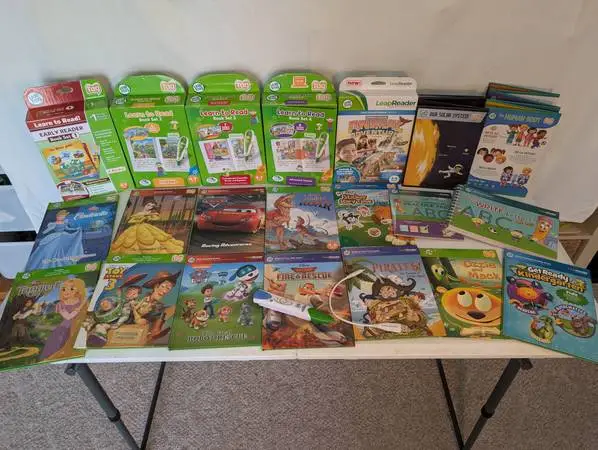
Leap Reader Reading & Writing System Pen + 42 books
Learn to read by exploring interesting stories with the LeapReader System. By touching the interactive pages using the Leap Reader Pen young readers can sound out letters and words or follow along with the stories as they’re read out loud. Lively character voices, music, and sound effects spark a childs interest and interactive activities help build reading confidence by introducing vowel sounds, sight words, word blending, spelling skills, and more. Skills Taught: • Phonics • The Alphabet • Vowels • Consonants & Blends • Sight Words • Reading Comprehension • Reading Fluency • Reading for Information • Vocabulary • Writing This purchase includes: • Leap Reader Reading and Writing System “Pen” • USB charging cable • Learn to Read! Book Set 1: 6 books (Short Vowels) • Learn to Read! Book Set 2: 6 books (Long Vowels, Silent E, and Y as a Vowel) • Learn to Read! Book Set 3: 7 books (Consonant Blends & Digraphs) • Learn to Read! Book Set 4: 6 books (Advanced Vowels) • Solar System Adventure Pack • Interactive Human Body Discovery Pack • Learn to Write Letters with Mr. Pencil • Animal Adventure Interactive Game • Pirates! The Treasure of Turtle Island • Beauty and the Beast: The Enchanted Rose • Disney Pixar Cars: Racing Adventures • Paw Patrol: The Great Robot Rescue • Toy Story 3: Together Again • Disney Tangled • Disney Planes: Fire & Rescue • T. Rex’s Mighty Roar • Ozzie and Mack • Disney Cinderella: The Heart That Believes • Get Ready for Kindergarten • Pet Pals Sticker Story Time • Let’s Play Tag! Sampler book Not all books are currently loaded on the LeapReader Pen. It holds 198 MB of content. Follow these steps to create your own account and switch out the various books. Setup and charging • Install the LeapFrog Connect app: Go to leapfrog.com/connect and install the application on your computer. • Charge the device: Plug the LeapReader into a USB port on your computer to charge it. A green light will appear when it is fully charged. Downloading content • Connect and register: Plug the LeapReader into your computer and open the LeapFrog Connect application. • Download audio: Select and download the companion audio for your books directly from the application. The application can often automatically download audio for books you touch on the device. • Disconnect from computer: Once the download is complete, disconnect the LeapReader from your computer. cash or Venmo only must pick up

Introducing Ditchit - The Ultimate Local Marketplace!
Buy, Sell, Ditchit - The Win-Win Marketplace.
Ditchit offers a thrilling experience: list in 30 seconds, explore new arrivals daily, and connect with buyers and sellers in a secure community. Build your reputation, find hidden gems, and join millions of users shopping locally!